
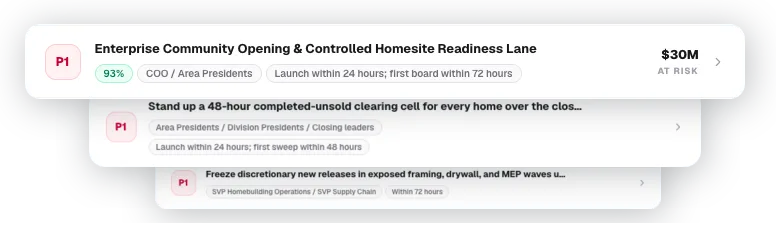
What Action Agents do
Execution based on diagnosis, not guesswork.
Action Agents convert analysis into execution. Once Frontier knows a work item is stalled and why, the system identifies the most useful next actions and ranks them by impact — following up with a customer, escalating a delayed approval, creating a Jira task, posting a Slack message, drafting an email, or updating a project record.
A dedicated Tool-Selection Agent decides where each recommendation belongs instead of giving every agent access to every system. Access is scoped per customer, and credentials are isolated so the model itself does not hold sensitive access.
Connected systems
Jira
Create or update issues with owner, deadline, and evidence attached.
Slack
Post approved messages to the right channel for the right team.
Confluence
Read or write documentation where your team already works.
Draft follow-ups based on the actual blocker and recent thread history.
CRM / ERP
Update records, add notes, change statuses, or log approvals.
Close the gap between dashboards and execution.
Leadership does not just see risk. They see whether the organization is responding to it — with actions assigned, tracked, and measured against actual outcomes.
What needs to happen today?
Who owns the next step?
Which action has the highest business impact?
Has the action been sent, assigned, approved, or completed?
Did the action actually move the work forward?
How it works
From diagnosis to completed step.
Frontier starts with the diagnosis from the Reasoning Agents. Then it creates a small set of concrete next steps — the actions most likely to unblock the item or protect the business outcome. Each action includes the owner, reason, evidence, expected impact, and suggested channel.
If the action belongs in a system, Frontier routes it there — creating or updating Jira issues, reading or writing Confluence documentation, and posting approved Slack messages in permitted channels.
For email-heavy workflows, the same loop applies: Frontier can ingest project-related emails, clean and classify the thread, attach it to the right project, use it as evidence in the diagnosis, and draft the follow-up when communication is the right next action.
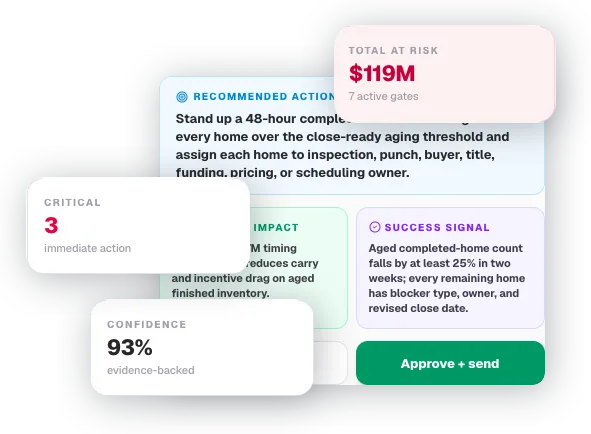
Five steps from analysis to completed action.
Prioritize
Frontier ranks the next actions by urgency, business impact, and likelihood of moving the work forward.
Draft
The agent prepares the message, task, note, document, or system update — ready for review or immediate execution.
Route
The action is sent to the right owner, team, channel, or system based on permissions and routing rules you define.
Approve or automate
Low-risk actions can run automatically. Sensitive actions require manager approval, routing rules, or edits before execution.
Measure
Frontier watches whether the action changed the outcome: did the project move stages, did the customer respond, did the approval clear?
Examples of actions Frontier can handle
Execution across every layer of your operation.
Follow-ups
Draft and send a customer, partner, or internal follow-up based on the actual blocker and recent communication history.
Escalations
Notify the right manager when a work item is at risk of missing SLA, delaying revenue, or blocking another team.
Task creation
Create a task with the right owner, deadline, context, and evidence attached — in Jira or wherever your team works.
System updates
Update records, add notes, change statuses, or create documentation where your team already works.
Manager summaries
Prepare a short daily list of the highest-impact actions for each team, manager, or executive.
Immediate action
Every flagged item becomes a queue of ready actions.
Ranked by impact, assigned to the right owner, routed to the right system — with approval controls where you need them.
Action queue
Solar Installation — Permit Stage — Day 18
Move the work forward.
Prioritize, route, approve, and execute the actions that protect revenue and keep operations moving.
Book a demo